October 12, 2026 · 9 min read
Building BookWave Audio, Then Handing It to AI Agents
I built an app that turns any book into an audiobook, got my first customer through SEO, and then moved on to other projects. Keeping it alive meant handing it to AI agents. ChatGPT wouldn't act, local models couldn't keep up, and Meta's new Muse agent finally did.
By Owen Kruse

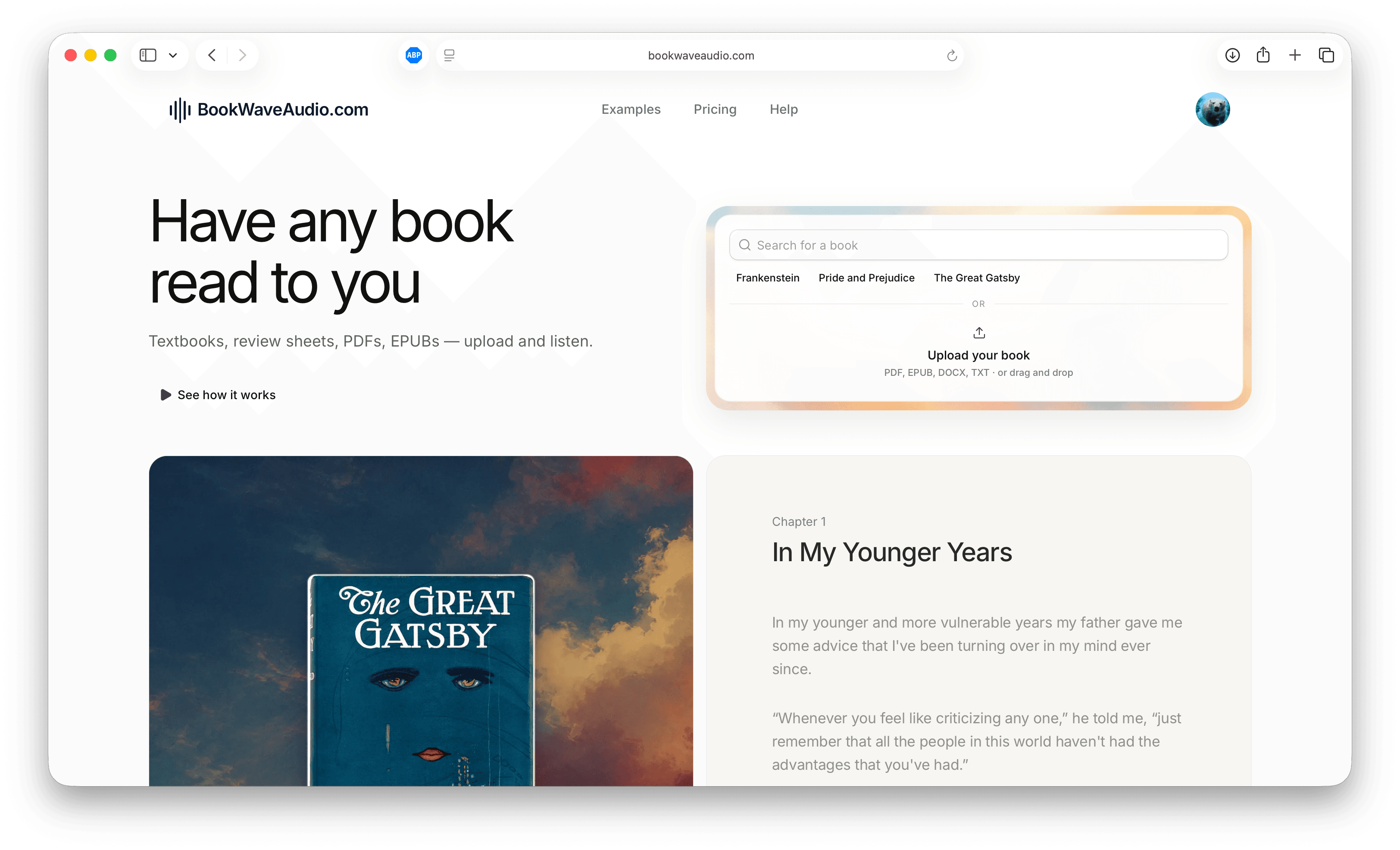
A lot of what I want to read doesn't have an audiobook. Textbooks, review sheets, PDFs from class, public-domain classics with no good recording, and drafts friends send me all exist only as text. I wanted to listen to them on a walk the same way I'd listen to anything on Audible.
So I built BookWave Audio. You upload a PDF, EPUB, DOCX or text file and get back a chapter-structured audiobook with natural narration in more than 70 languages. This post covers how I built it, how I found my first paying customer without spending on ads, and what happened when I moved on and tried to let AI agents run it.
Building it
Books are messier than they look
The hardest part of BookWave wasn't the voices. It was the books. A PDF is really a set of instructions for drawing text on a page, not a book. Page numbers, running headers, footnotes, hyphenated line breaks and two-column layouts all have to be cleaned up before anything gets read aloud. Nobody wants to hear a narrator say "Chapter Three, page 47, The Great Gatsby" in the middle of a sentence.
So most of the pipeline is about turning a file into a clean book: finding where chapters start, removing the junk around the edges and keeping everything in the right order. EPUBs are much kinder than PDFs, but even they have surprises.
Narration that sounds like a reader
Flat text-to-speech is fine for a paragraph and exhausting for four hours. To make it listenable, BookWave reads the text first and marks up how it should be performed, like where a line is quiet, where a character is thoughtful and where someone chuckles, and then hands that to the voice model. The difference between that and plain TTS is the difference between someone reading to you and a screen reader.
I also built a small set of narrators with distinct personalities, each matched to the kinds of books they suit. Ethan is warm and conversational for memoir and contemporary fiction. Daniel is calm and reflective for classics and history. BookWave can suggest a voice from the book's genre and tone, and you can preview it before you pay for anything.
Pricing for one book, not a subscription
Most people don't need an audiobook every month. They need this book, for this exam or trip. So BookWave is pay-as-you-go first, starting at $4.99 per book, with an optional monthly plan for regular listeners. You get M4B and MP3 downloads with chapters and cover art, so the finished book works in whatever player you already use.
The first customer came from Google
I didn't run ads for BookWave. I wrote pages that answered the questions people were already typing into Google.
People don't search for "AI audiobook platform." They search for things like "app that reads books to you", "turn a PDF into audio" and "listen to my textbook." So I built the site around those phrases: pages for each file type, pages for students and authors, and free sample audiobooks of public-domain classics like Frankenstein, Pride and Prejudice and The Great Gatsby so people could hear the product before signing up. The samples ended up doing double duty. They show off the narration, and they give search engines real content to index.
Then I waited, which is the part of SEO nobody enjoys. For weeks the traffic was mostly me checking my own site. Then one day a payment notification came in from someone I'd never heard of. They had searched for a way to listen to a PDF, landed on one of those pages, previewed a voice and paid to convert their book.
It wasn't much money. It was still the most satisfying moment I've had building anything, because nobody I knew sent them. A stranger had a problem, searched for it, found my page and decided BookWave was worth paying for. After that I trusted SEO a lot more. It's slow to start, but it keeps bringing people in long after you stop working on it.
Moving on
By spring I was spending most of my time on other projects, like Preso and Model Gambit. BookWave was working, but working products still need care. Support emails need answers, search rankings drift, new competitors show up and small bugs pile up.
I didn't want to shut it down, and I didn't have time to run it properly. So over the summer I tried something I'd been curious about for a while: handing the day-to-day work to AI agents and seeing how much of a small business they could actually run.
ChatGPT: great advice, no action
My first attempt was ChatGPT. I gave it the context on BookWave, the analytics and a list of things that needed doing.
It was a great advisor. Ask it what to do about a drop in traffic and you'd get a thoughtful, well-organized plan. The problem was that I got a plan every time. It would recommend rewriting a page and then ask whether I wanted it to draft the rewrite. It would draft the rewrite and then suggest I review it. It would find a broken link and tell me how to fix it.
It was too passive. Every step stopped and waited for me, which meant BookWave still moved only as fast as I did. An agent that needs a person to approve every step isn't running anything. It's just a very polite to-do list.
Local models: where the gaps are
Next I wanted to see how far I could get with small open models running on my own machine. The appeal was obvious: no API bills, nothing leaving my computer and the freedom to let an agent loop as long as it wanted.
For narrow jobs they were fine. Summarizing a support email, writing a meta description or tagging a book's genre all worked well enough. The gaps showed up as soon as the job got longer.
- They lost the plot on multi-step work. A task like "find the pages that dropped in search, figure out why and fix them" needs a plan held across dozens of steps. Small models would start well and drift, redo steps they'd already done or call it finished halfway through.
- Tool use was fragile. They'd call a tool with the wrong arguments, misread the result and build confidently on top of the mistake.
- They didn't know when they were wrong. A frontier model will often notice something doesn't add up and go check. The small models mostly kept going.
That experiment changed how I think about the gap between frontier models and small open ones. On short benchmarks the gap looks small. On a long, messy, real task, it's the difference between finishing the job and getting lost. The small models are improving fast, and I'll keep testing them, but I wasn't ready to hand them a business.
Muse: an agent that takes initiative
In September, Meta launched Muse, a personal AI agent built on its new Muse Spark model. A few weeks later it opened Muse for Small Business, which connects to the tools a small company already runs on, like Stripe, Shopify, Slack, Notion, Canva and Meta's own ad accounts and Instagram analytics. Meta's pitch was that small business owners are "short on hours, not ideas," which described me and BookWave exactly. I signed up the week it came out.
What makes Muse different from a chatbot is where it lives. Each user gets a dedicated cloud computer, which Meta calls the Muse Secure VM, with its own browser. Muse can open sites, fill out forms, send email and keep working after I close the app. It checks back in when something changes or when it needs a decision. That one design choice fixed the problem I had with ChatGPT. Muse doesn't end its turn by handing the work back to me.
It took initiative. I didn't give Muse a list of tasks. I connected BookWave's Stripe account, analytics and support inbox, gave it a goal, which was to grow BookWave and keep customers happy, and it started finding the work itself. It went through the search data, noticed which pages were close to ranking and rewrote them. It found a file format that kept failing to convert and sent me an example. It drafted new sample audiobooks for classics people were searching for. Meta says Muse remembers what matters to you and acts on details you've mentioned only once. In practice that meant I could say "students are my best customers" one time and see it shape everything after.
It was willing to spend to win. This surprised me the most. Muse treated the budget as a tool, not something to protect at all costs. When it saw search terms that were converting well, it proposed small Instagram and Facebook ad tests aimed at the same audience, using the ad account it was already connected to. It suggested paying for tools when it thought they'd pay for themselves, and it set up paid experiments it could measure. A passive assistant tends to say "here are some free options." Muse acted more like a founder who wanted the thing to work and understood that sometimes that costs money.
That same quality is why I didn't hand over the keys completely.
How I stay in the loop
Letting an agent spend money and talk to customers for you is only reasonable if you know where the edges are. Some of those edges are built into Muse, and the rest I set myself.
What Muse enforces:
- Approval before sensitive actions. Muse asks before it sends an email or makes a purchase. Those prompts show up on my phone, and nothing goes out until I tap yes.
- A second agent watching the first. Muse can't reach the internet on its own. A separate agent Meta calls Sentinel runs on the same machine, walled off from Muse, and has to approve its outside actions. I like that the thing checking the agent isn't the agent itself.
- Payments that don't expose my card. Purchases go through Stripe's Link agent wallet, which creates a one-time card for each purchase. Muse never sees my real card number.
- An audit trail. I can see everything Muse has done and what it plans to do next, which is where most of my review happens.
What I add on top:
- A hard budget. Muse works within a fixed monthly limit. Anything over it, or any new recurring cost, needs a separate conversation with me first.
- Approval for anything irreversible or public. Pricing changes, refunds, deleting anything and big homepage changes all need my yes. Rewriting a help page doesn't.
- I read the customer conversations. Muse drafts replies to support, but I read every thread. Customers are the one place where a confident wrong answer actually costs something.
- I own the direction. Muse decides how to grow BookWave. I still decide what BookWave is: who it's for, what it costs and what it will never do.
This isn't paranoia. Meta's own safety report says the model behind Muse can still be tricked by prompt injection when it's acting as an agent, meaning a web page or email can contain hidden instructions that steer it. Meta is paying bug bounties for exactly that kind of attack. An agent with a browser, a payment method and access to your inbox is powerful in both directions. The approval prompts are the price of letting it act, and I think it's a fair price.
The split has worked well so far. I spend an hour or two a week on BookWave instead of every evening, and it's still growing. It isn't hands-off, and I don't think it should be yet. But it's the first time an AI has felt like a teammate on one of my projects instead of a tool I have to drive every step of the way.
What I took from it
- SEO is the patient builder's ad budget. It's slow, but my first customer came from it and so do most customers since.
- Advice isn't action. The most useful agent wasn't the one with the best answers. It was the one that actually did things.
- Small models aren't there yet for long-running work. They're useful for narrow jobs and fall apart on long ones. That gap matters more than benchmark scores suggest.
- Give agents boundaries, not a script. The best results came from a clear goal, a budget and a short list of things that need my approval, not from step-by-step instructions. It helps a lot when the agent's own guardrails, like approval prompts and a separate agent checking its actions, are built in rather than bolted on.
If you've got a book, a PDF or a stack of class notes you'd rather listen to, you can try BookWave and preview a narrator for free. And if you're handing your own side projects to agents, I'd love to hear where you've drawn the line.